DTF System for DTF Transfers
A DTF setup can look straightforward when the equipment arrives in crates, but the difference between a system that simply powers on and one that produces dependable commercial output is in the installation. If you are researching how to install a DTF System for DTF Transfers, the key is to treat it as a production line, not a single machine.
That matters whether you are launching a new garment decoration service or adding DTF capacity to an established print room. The printer, shaker or curing unit, heat press, consumables, environment and operator workflow all affect transfer quality, turnaround times and waste levels. A proper installation gives you consistency from the start and reduces the expensive trial-and-error that often follows rushed setups.
What a complete DTF installation actually involves
DTF installation is not only about placing a printer on a stand and loading ink. A commercial system includes several connected stages: printing, powder application, curing, pressing and handling finished transfers. If one stage is cramped, poorly ventilated or incorrectly powered, the whole process suffers.
DTF System for DTF Transfers
For most businesses, the practical starting point is to map the workflow before anything is unpacked. You want film and printed transfers to move in one direction through the room without crossing dirty and clean areas or forcing operators to double back. That sounds simple, but poor layout is one of the most common causes of contamination, bottlenecks and damaged prints.
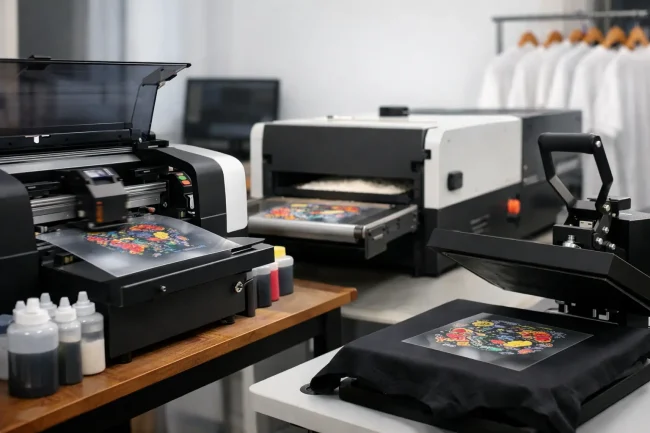
A complete installation usually includes the printer itself, a curing solution such as a shaker and dryer or separate oven arrangement, a heat press, an ink management or stirring solution where required, storage for films and powders, a RIP workstation, and enough bench space for loading, unloading and quality checks. In a commercial environment, those supporting elements are not optional extras. They are part of the system.
Before you install: space, power and environment
The best way to approach how to install a DTF System for DTF Transfers is to start with the room, not the machine. DTF printers need a stable environment. Temperature swings, damp conditions and dusty spaces can all affect print performance, powder behaviour and adhesion.
A clean, dry workspace with controlled temperature is the baseline. If the room is too cold, ink behaviour can become less predictable. If it is too humid or too dusty, film handling and curing can become inconsistent. Businesses sometimes focus heavily on printer specification and then place the unit in a corner of a busy workshop where doors are opening all day and airborne debris is unavoidable. That tends to create avoidable problems.
Power supply also needs checking in advance. Different systems have different electrical requirements, particularly once you include curing equipment and presses. It is worth confirming socket locations, load capacity and whether dedicated circuits are advisable. The installation may be physically possible without this planning, but reliable day-to-day production may not be.
Ventilation is another area where commercial users should be realistic. Powder handling and curing generate heat and require sensible extraction or air management. The exact requirement depends on the system and the room, but this is not something to leave until after the equipment is in place.
How to install DTF system equipment in the right order
Once the space is ready, installation should follow the production sequence. Start by positioning the printer where operators can access the front, sides and rear as required for maintenance, loading and cleaning. Pushing a machine tightly against a wall may save floor space, but it often makes routine servicing more awkward.
The curing stage should sit close enough to keep film movement efficient, but not so close that the area becomes congested. You need room to collect printed film, apply or process powder correctly, and move transfers safely into curing without bending, smudging or contaminating them. If you are working with a shaker and dryer system, alignment and feed path matter. If you are using a more manual process, bench space becomes even more important.
The heat press should then be located as a separate finishing station. In smaller premises it can be tempting to squeeze pressing into the same footprint as print production, but separation usually improves both safety and workflow. Pressing often happens at a different pace from printing, especially when handling short runs, mixed garments or repeat orders.
Finally, install the RIP computer and control area where the operator can monitor jobs without placing electronics in an overly hot or powder-heavy environment. The computer station should support file handling, queue management and production visibility rather than becoming an afterthought on a shelf.
Ink, film and consumables setup
After the hardware is positioned, the next stage is preparing the machine for production. That includes fitting inks correctly, checking agitation or circulation where applicable, loading film, and confirming that the printer software and RIP settings are configured for the intended workflow.
This is where many new users underestimate the value of training. DTF is accessible, but commercial consistency depends on correct daily practice. White ink management, in particular, needs disciplined handling. If the system includes ink stirring or circulation support, it should be commissioned properly from day one rather than treated as a convenience feature.
Consumable storage should also be built into the installation. Films, powders and inks should be kept in stable conditions and organised so stock rotation is easy. Leaving consumables open to workshop dust, damp or fluctuating temperatures can undo the benefits of a good printer setup.
Calibration and test production
A proper installation is not complete when the first print comes out. It is complete when the first repeatable, press-ready transfer is produced and tested under normal operating conditions. That means running calibration prints, checking ink laydown, confirming powder coverage, validating curing performance and pressing onto suitable garments to assess wash durability and finish.
There is always some adjustment at this stage. Feed, heat, dwell times and workflow details often need refining to match the exact environment and materials in use. That is normal. What matters is that adjustments are made methodically.
A rushed setup often leads operators to change multiple variables at once when a result is not right. Then nobody knows whether the issue came from printer settings, powder application, curing temperature or press technique. A structured commissioning process avoids that confusion and gives the business a documented baseline for future runs.
The trade-off between self-installation and supported installation
Some businesses considering how to install DTF system equipment assume self-installation will save money. In some cases, especially with simpler or smaller setups and experienced operators, that can work. But there is a trade-off.
A self-installed system may appear cheaper at the point of purchase, yet cost more through downtime, wasted consumables and slower production learning. Commercial users usually benefit from installation support because it shortens the path to saleable output. That is especially true if DTF is a new process for the team or the system is part of a broader production expansion.
Supported installation tends to cover more than assembly. It gives the operator a clear handover, practical training and a working benchmark for future troubleshooting. For a business that needs dependable output rather than experimentation, that support has direct operational value.
Common installation mistakes that affect output
Most installation issues are not dramatic technical failures. They are small practical oversights that create repeated quality problems. Poor room conditions, insufficient space around equipment, weak workflow planning, inadequate power provision and casual consumable storage all show up later as inconsistent print quality or lost production time.
Another common mistake is underestimating operator access. Printers need routine cleaning and inspection. If daily maintenance is awkward because the machine is boxed in, it often gets delayed. The same applies to curing units and presses. Easy access supports good habits.
There is also a tendency to buy for the printer and under-specify everything around it. If the heat press is inconsistent, if there is no proper area for film handling, or if the team has not been shown how the full process links together, even a capable printer will not deliver the results it should.
Why installation support matters for growing businesses
For start-ups, a well-installed DTF system reduces risk. For established print shops, it protects throughput and customer deadlines. In both cases, installation should be treated as part of the investment, not an afterthought once the equipment has been delivered.
That is why many commercial buyers choose a supplier that can support the entire system rather than shipping boxes and leaving the rest to the customer. A complete approach covers equipment compatibility, commissioning, training and after-sales guidance. DTF Magic® works in that way because long-term output matters more than a quick sale.
If you are planning your first DTF line or upgrading an existing one, the smartest installation decision is usually the one that makes daily production easier six months from now, not just easier on delivery day. Build the room around the workflow, install the equipment as a system, and make sure your team starts with the right support. That is what turns a DTF setup into a reliable production asset.